

What BIMOBIMO is and how it presents itself
BIMOBIMO calls itself a platform for “immersive conversations, virtual relationships, and interactive roleplay” (bimobimo.com). Palette Beat Inc is the studio behind it (App Store). The app used to be called Beemo AI, and traces of the old name still show up in the Android package identifier, a small detail that mostly matters if you’re wondering why search results sometimes mix the two names.
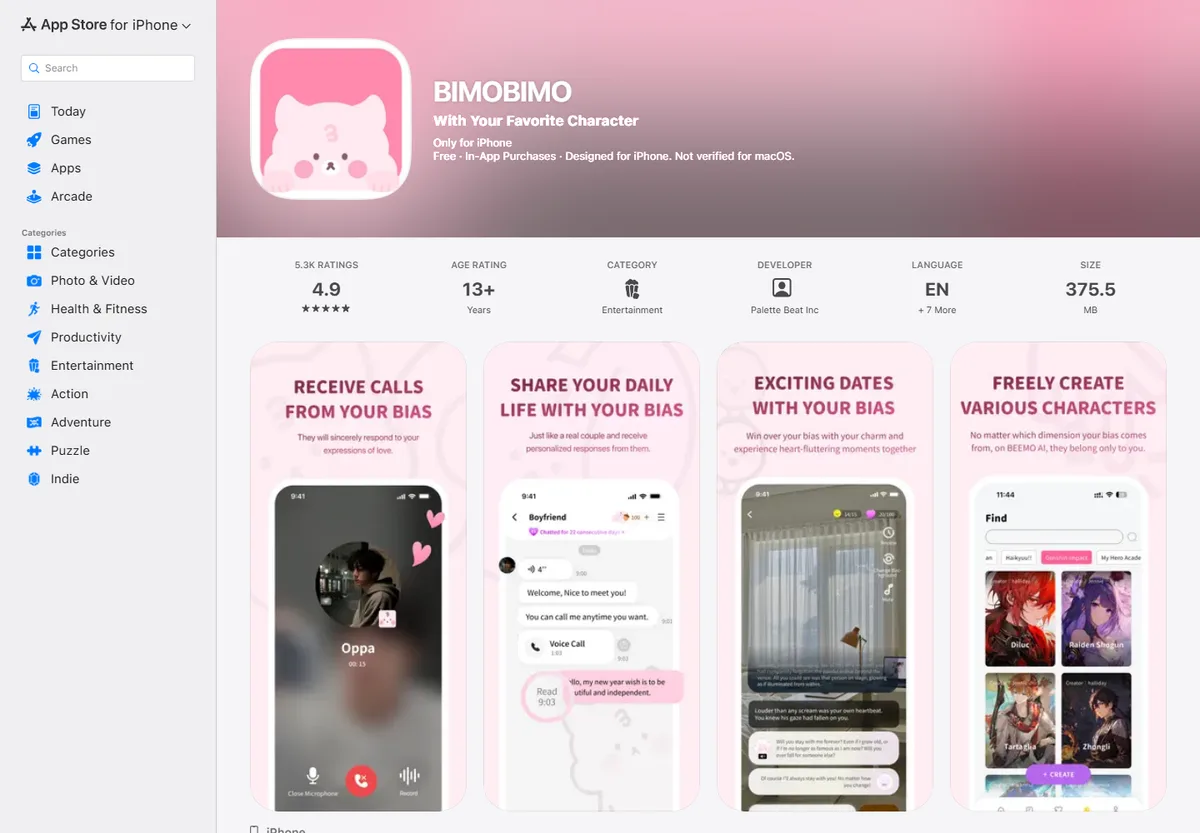
The App Store listing doesn’t sell an endless character catalog. It sells “talk and get an answer”: text and voice messages, calls, date mini-games, morning and evening widget messages, and a co-sleeping mode with whisper audio and white noise. There’s also a character builder where you set appearance and voice yourself.
I skipped the rest of the pitch and just opened the catalog to see what actually works.
Companion picks
Pick a character to start with
Try a few different characters before you decide who feels right.

Military Team
Five Call of Duty operatives
Best for a group chat with Ghost, König, Keegan, Krueger and Nobody: military discipline, dry humor and five voices at once.

Ethan
Warm, playful boyfriend
Best when she wants a warm first message, soft comfort, and an easy chemistry check.

Satoru Gojo
The strongest sorcerer
Best for a playful, cocky first chat where the teasing hides a protective streak.

Cain
Centuries-old vampire
Best for a dark, slow-burn first chat with a cold, commanding man who guards the ones he lets close.
Picking a character and seeing what happens
The catalog is pleasant to browse: mood tags, a short personality blurb, no wall of near-identical faces to scroll through. I looked at maybe five before landing on a character with an actual story hook instead of a generic “hey there.” My first message wasn’t a throwaway line either, it included a specific action and one detail meant to pull the story forward. The bot picked it up fast and answered with real detail from what I’d written, not a stock line that could apply to any opener.
Long messages are where BIMOBIMO actually shows what it can do. It holds the thread, writes at length, and doesn’t collapse into two-word replies after the third exchange. A detailed App Store review says almost the same thing, that the bot reacts well to longer messages and feels like there’s a real person on the other end (App Store reviews). The same review is honest about the flip side too: vocabulary gets thin over time, the bot leans on a small handful of stock reactions, and it doesn’t understand images you send. I tested that last part myself, sent a photo mid-conversation, and the bot responded as if I’d typed nothing meaningful at all, no acknowledgment of what was actually in the picture.
I also poked around the character builder. Appearance and voice are both adjustable, and the interface itself is clean and easy to follow. One thing to flag: the App Store listing shows support for English plus seven other languages, so if your preferred language isn’t in that set, expect a noticeably thinner vocabulary and fewer stock phrases to work with.
While I was still testing the settings, it became clear my impressions weren’t unusual. Other users describe the same pattern.
What users say: realistic dialogue against everyday friction
Chat and calls in BIMOBIMO feel like talking to an actual person rather than a scripted bot, a reaction that shows up repeatedly across App Store reviews and lines up with what I saw (App Store).
Right next to that praise sit steady complaints about repetition. Characters start recycling the same lines, and scheduled calls drift out of sync with the text conversation, so it can feel like talking to two different people at two different points in the relationship, since memory between the two channels doesn’t line up cleanly (App Store). The same thread describes a bug where replies suddenly arrive one word at a time, turning a charming quirk into something genuinely annoying to sit through.
The other recurring theme is the acorns limit. The daily bonus varies from user to user, and once it’s spent, you either wait for the next reset or pay to keep going.
The acorn ceiling is one kind of friction. Access and payment are a bigger question for anyone deciding whether to commit.
Availability and payment
A few practical facts worth knowing before you install anything.
BIMOBIMO’s terms of use describe payment through in-app purchases on the App Store and Google Play, processed by third-party payment providers (terms of use). The acorns currency is bought through those same store mechanics, and it’s non-refundable and can’t be transferred to another account. There’s no direct card checkout or PayPal option on the BIMOBIMO site itself, so you’re limited to whatever payment methods are already tied to your Apple or Google account.
On language, the App Store listing caps out at English plus seven other languages, and that’s not just a checkbox limitation, the vocabulary genuinely narrows once you’re outside English, based on what long-form reviews and my own testing show.
Before deciding whether these tradeoffs matter to you, it helps to see the fuller picture of strengths and weaknesses side by side.
BIMOBIMO pros and cons
Pros
- Genuinely alive, detailed conversation style that holds up in long messages and remembers story details within a chat.
- Voice messages, based on user reviews, don’t spend acorns just for listening.
- Flexible character builder for appearance and voice.
- Extra engagement formats beyond chat: date mini-games, a morning/evening message widget, and a co-sleeping mode with whisper audio and white noise.
Cons
- No photo recognition, the bot treats an image you send as if nothing was attached.
- Repetitive phrasing over time, plus calls and text drifting out of sync with each other.
- A reported bug where replies arrive one word at a time.
- Full language depth only in English and a short list of other supported languages.
- A daily acorns cap that forces a wait or a payment once you’ve used it up.
- Payment limited to Apple’s and Google’s in-app purchase system, with no direct card or PayPal checkout.
None of these cons are dealbreakers on their own, but stacked together they’re worth weighing against what else is out there.
Where mybf.bot fits in
If the “talk and get a real answer” format works for you but the ceilings around it don’t, there’s somewhere else to look right now.
BIMOBIMO’s core loop is talk-and-respond: text, voice, calls. mybf.bot covers that same everyday feel with Real chat, a mode built for ordinary back-and-forth texting with a character, no forced scene-setting required, which lines up closely with what BIMOBIMO does by default. But mybf.bot also offers Roleplay for scene-driven stories and Story for a more narrative format, so the format choice is wider from the start. It’s not a feature-for-feature clone: there’s no date mini-game or white-noise sleep mode here. What you get instead is the ability to pick the chat model and conversation style that fits the mood you’re in rather than working within one fixed script.
Where BIMOBIMO stumbles on photo recognition, registered mybf.bot users get generated photos and voice replies from their character directly in chat, within the plan’s current limits. BIMOBIMO’s character builder covers appearance and voice, and mybf.bot has a matching one: you can create your own character, keep it private, or submit it for moderation and publish it to the shared catalog. I ran into a similar tradeoff comparing another AI companion app in my Sakura AI review, and the logic held there too: judge the original honestly first, then check what actually fixes your specific annoyances.
Who should stick with BIMOBIMO, and who should try something else
If the acorns system doesn’t bother you, English works fine for how you’d use it, and the widget messages, date mini-games, and co-sleeping mode matter more than anything else on this list, BIMOBIMO is a solid pick, especially if paying through the App Store or Google Play is a non-issue for you.
If you’d rather not budget around a daily currency reset, want more say over conversation format and character creation, and want photo and voice replies without hitting a wall on image recognition, it’s worth starting a chat with an AI character on mybf.bot and comparing the experience yourself. This same tradeoff between an unfiltered original and a more flexible alternative comes up outside BIMOBIMO too, I covered a version of it in my Character AI alternatives piece, and the underlying question is the same one: which limits are you actually willing to live with.