

What should you decide before starting a Janitor AI chat?
A character portrait tells you very little about how the conversation will feel. The greeting and opening scenario matter more. One character may begin with a casual conversation, while another drops you into a detailed fantasy scene and expects you to continue it.
Before replying, check:
- who the character is supposed to be;
- where the scene begins;
- how much detail appears in the greeting;
- whether the tone matches the conversation you want;
- whether the character card leaves you enough room to make your own decisions.
A detailed opening usually gives you more to work with than a blank greeting. You do not need to write a miniature novel in response, but “hi” rarely gives the character a useful direction.
There is also no reason to start with API keys, third-party configurations, or complicated setup guides. Begin with the normal chat path from the character page. Change a setting only when you can name the problem you are trying to solve.
How to use Janitor AI step by step
1. Open the official website
Go to the official Janitor AI website rather than a mirror, unofficial download page, or third-party login form. Browse the available characters and open the card that interests you. If the site asks you to sign in before chatting, use one of the account options shown there.
Keep your profile minimal. A roleplay chatbot does not need your legal name, workplace, home address, or links to personal accounts. Do not send identity documents, payment information, passwords, private keys, or details that reveal your exact location.
Companion picks
Pick a character to start with
Try a few different characters before you decide who feels right.
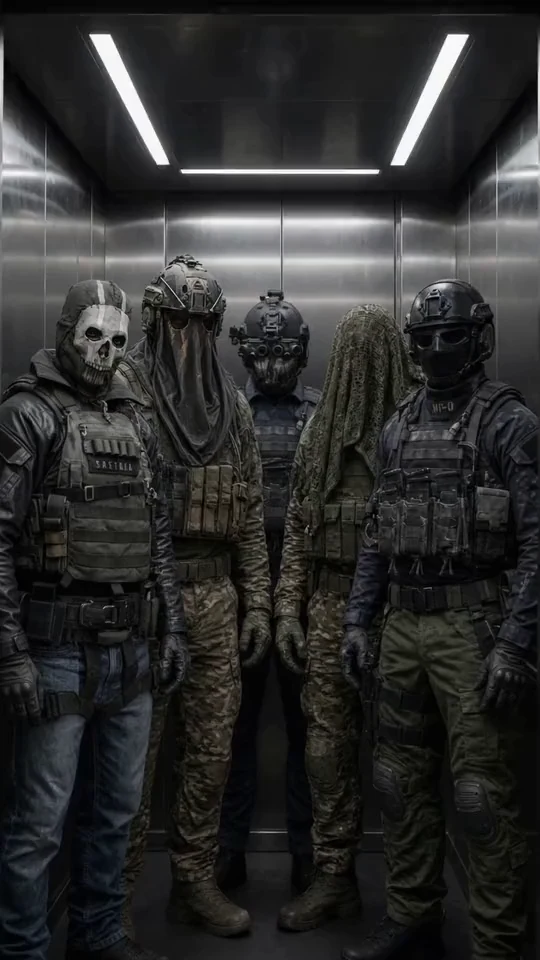
Military Team
Five Call of Duty operatives
Best for a group chat with Ghost, König, Keegan, Krueger and Nobody: military discipline, dry humor and five voices at once.

Ethan
Warm, playful boyfriend
Best when she wants a warm first message, soft comfort, and an easy chemistry check.

Satoru Gojo
The strongest sorcerer
Best for a playful, cocky first chat where the teasing hides a protective streak.

Cain
Centuries-old vampire
Best for a dark, slow-burn first chat with a cold, commanding man who guards the ones he lets close.
2. Choose a character by scenario, not artwork
Read the greeting before committing to a chat. It shows whether the character writes brief dialogue, long narrative passages, or a mixture of speech and actions.
Suppose the opening takes place in a quiet café. Instead of sending a generic greeting, continue the situation:
I sit across from you and order coffee. Keep your replies calm and concise. We have just met, so let the relationship develop gradually and do not decide my actions for me.
This gives the character a location, pace, and boundary. It also leaves room for an actual response.
If writing the first line feels oddly similar to filling in a blank page, these examples of how to start an AI character chat without making it awkward can help. The same techniques work with characters of any gender.
3. Write a useful first message
A good first message does two jobs. It tells the character how to respond, then gives the scene somewhere to go.
Use a compact instruction such as:
Stay in character and write two or three paragraphs per reply. Describe only your own dialogue, thoughts, and actions. Leave my choices and reactions to me. Keep any romantic development gradual and do not add comments outside the scene.
Follow it immediately with the opening:
We meet at a mutual friend’s party. I am standing near the window, taking a break from the noise, when I notice you doing the same. “Want to step onto the balcony? We might actually be able to hear each other out there.”
The situation creates momentum without scripting the character’s answer. It also avoids one of the most irritating roleplay problems: the bot writing both sides of the conversation.
4. Correct problems with one clear instruction
When a reply is too long, do not rewrite the entire setup. Ask for shorter responses and continue the scene.
If the character starts controlling your actions, use:
Describe only your own words, thoughts, and actions. Leave my dialogue and decisions to me.
If the tone becomes too intense:
Slow the pace down. We are still getting to know each other, so keep the interaction friendly and restrained.
Short corrections preserve the conversation better than a long technical lecture inserted between two lines of dialogue.
5. Assess the character before changing settings
Read several replies before deciding that the setup is broken. Check whether the character:
- follows the current scene;
- maintains a consistent personality;
- respects the requested response length;
- leaves your decisions to you;
- avoids repeating the same reactions.
Change one instruction at a time. If you alter the character, scene, response style, and technical settings together, you will have no idea which adjustment helped.
Do not paste API keys from comments, public prompts, or unofficial tutorials. Never share your own key with another person. External connections are an advanced configuration choice, not a requirement for discovering whether you enjoy the character.
How do you create a better character card?
A long biography does not automatically produce a convincing character. Contradictory details can make the conversation less stable, especially when the card mixes several personalities or relationship dynamics.
Start with five elements:
- The character’s identity and role.
- Their speaking style.
- What they know about the user when the story begins.
- The actions or narrative habits they should avoid.
- The opening scene.
For example:
Adrian, 31, is a calm photographer with dry humor. He speaks warmly but does not become intimate too quickly. He meets the user at an evening gallery opening. He never writes the user’s thoughts, dialogue, or decisions. His first message begins beside a wall of black-and-white photographs.
Run a short conversation before expanding the card. A specific flaw, such as overly formal dialogue, is easy to correct. A five-page profile full of competing instructions is much harder to untangle.
Janitor AI pros and cons
Strengths
Janitor AI works well for browsing character concepts and entering a scene directly from a character card. The written format gives you considerable control over pacing, boundaries, and narrative style. People who enjoy shaping a roleplay through prompts may find that process rewarding.
Character cards can also provide an immediate premise. A strong greeting saves you from inventing the entire setting before the first reply.
Weaknesses
The experience depends heavily on the selected card and the instructions you provide. A visually appealing character can still have an awkward greeting, an unsuitable writing style, or a scenario that gives the user little room to act.
Janitor AI may also feel demanding if you want the product to guide the setup for you. Correcting response length, scene control, and pacing through repeated messages is part of the experience rather than an occasional extra.
Janitor AI vs mybf.bot
The practical difference lies in how each conversation begins.
Janitor AI starts with a character card and its existing scene. You then shape the conversation through your messages. This suits readers who enjoy manual direction and experimenting with different public character concepts.
With mybf.bot, you choose a male or female companion and can configure the conversation before it starts. The setup covers Roleplay, Real chat, or Story, followed by an opening scenario, response style, and selectable chat model. You can also skip the setup when you want a faster start.
| Feature | Janitor AI | mybf.bot |
|---|---|---|
| Starting point | Open a character card and continue its scene | Choose a companion, then configure or skip the chat setup |
| Scene control | Direct the scene through your messages | Choose a format and opening scenario before chatting |
| Response setup | Express pacing and boundaries in the conversation | Select style controls during setup and adjust supported chat preferences |
| Memory and continuity | The conversation is shaped through the selected character and current chat context | Registered users keep chat history and can review or edit memory |
| Relationship development | Develops through the story you direct | Five stages: Meeting, Interest, Trust, Closeness, and Love |
| Photos and voice | Not a deciding factor in this comparison | Registered users can request generated photos, send voice notes, and receive bot voice replies within current limits |
| Character creation | Suits people who like writing cards and scenarios | Registered users can create private characters or submit public characters for moderation |
| Free start | Depends on the current Janitor AI access flow | 5 guest messages, followed by a registered free plan with 30 daily text messages |
mybf.bot is the more structured option when you want continuity with one companion. Its editable memory, saved history, relationship stages, and pre-chat setup reduce the amount of repeated direction needed when you return to a conversation.
Janitor AI makes more sense when character discovery and manual scene writing are the attraction. The setup work is not necessarily a drawback if adjusting the roleplay is part of the fun.
If you are comparing the details that affect longer conversations, this guide to choosing useful AI companion features explains where memory, voice, photos, and personality controls make a practical difference.
mybf.bot is intended for adults 18+. Its optional adult settings apply to consensual adult conversations while strict safety boundaries remain in place. Regardless of the service, avoid sharing passwords, financial information, identity documents, or highly sensitive personal details with an AI character.
What are the best Janitor AI alternatives?
mybf.bot for guided setup and relationship continuity
mybf.bot fits readers who want a romantic or emotionally engaging character without writing every part of the setup manually. The catalog includes curated male and female companions, along with moderated public characters created by users. Registered users can also build a private character.
The setup wizard is the revealing difference. Before the chat begins, you can choose a format, scenario, response style, and chat model. After registration, saved history and editable memory help maintain continuity. Generated photos and voice features are also available within the free plan’s monthly allowances or through paid credits.
You can send 5 guest messages before signing up. Registration then saves the conversation and provides 30 free text messages per day, plus monthly photo and bot voice allowances. For a wider look at low-friction options, see this comparison of AI companion chats you can try before signing up.
Nomi for a memory-focused companion
Nomi presents its characters as AI friends, partners, mentors, girlfriends, or boyfriends. Its official feature set emphasizes short-term, medium-term, and long-term memory, custom backstories, voice chats, hands-free calls, selfies, proactive messages, and group conversations with multiple Nomis.
This makes Nomi a sensible option when you want to build an ongoing companion relationship rather than browse disconnected roleplay cards. It is free to start and does not require a credit card for initial access.
Kindroid for detailed customization
Kindroid gives users substantial control over a companion’s backstory, memory, voice, and visual identity. Its free plan includes messages on the Lite model, basic long-term memory, two Kindroids, limited selfies, and a lifetime audio allowance. New eligible free users can also receive a three-day premium trial that requires a payment method and converts automatically unless cancelled.
Subscribers receive access to flagship models, Cascaded Memory, stronger long-term recall, more characters and groups, custom voices, video calls, and expanded image features. Kindroid suits people who enjoy detailed configuration and expect to spend time refining a companion.
How can you compare AI character chats fairly?
Use the same opening scene with two characters:
We arranged to meet after a difficult day. Keep your replies calm, and do not offer advice unless I ask for it. Remember that I dislike crowded places. Describe only your own actions and leave my responses to me.
Do not judge the service from the first polished reply. Continue for several messages and watch for the details that become annoying over time. Does the character maintain the tone? Does it respect your control over the scene? Do you need to repeat the same boundary? Would you want to reopen this conversation tomorrow?
Choose Janitor AI if browsing character cards and manually directing each scene is the appeal. Choose Nomi for a memory-focused companion or Kindroid for deeper configuration. If you prefer a guided start with editable continuity, choose a character on mybf.bot, select a format and scenario, and send up to 5 guest messages before deciding whether to create an account.