

What is Joi AI, and who will enjoy it?
The Joi AI homepage does not ease you in gently. Open the catalog and you immediately see adult categories, elaborate introductions, and characters already acting out a scene before you send a message. The JOI Spicy name fits that tone.
Joi AI is a browser-based 18+ service with ready-made and customizable AI characters. Its main experiences include text roleplay, character creation, and image generation. You can pursue friendly, romantic, or explicit conversation and steer the tone through your prompts.
The service makes the most sense when you want a distinct visual character and a quick route into an adult scene. A character card usually gives you enough context to understand the proposed role before opening the chat.
That directness can also be limiting. Among the first characters shown on the homepage, many conversations begin with an erotic premise. Some users will appreciate the shortcut. Others may prefer to establish the character gradually instead of inheriting a fully written fantasy.
Companion picks
Pick a character to start with
Try a few different characters before you decide who feels right.
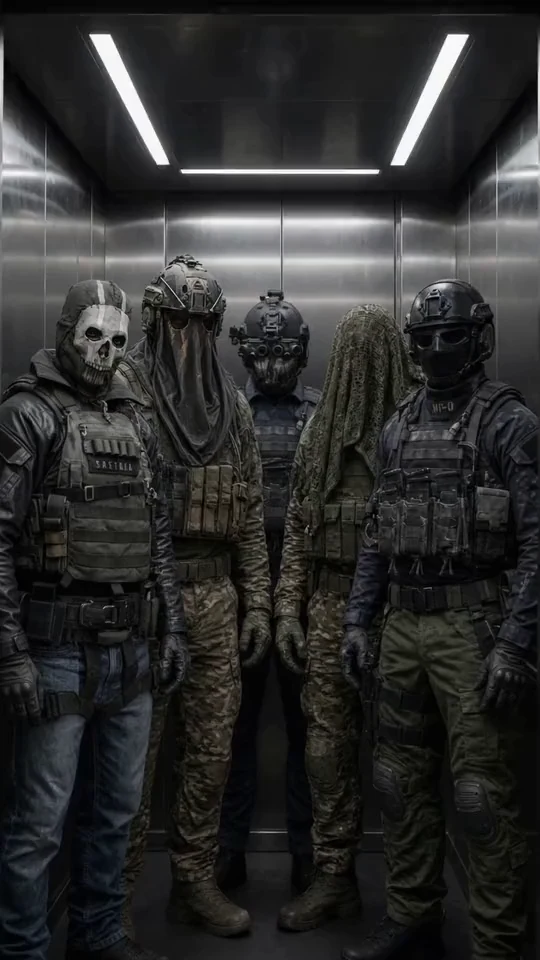
Military Team
Five Call of Duty operatives
Best for a group chat with Ghost, König, Keegan, Krueger and Nobody: military discipline, dry humor and five voices at once.

Ethan
Warm, playful boyfriend
Best when she wants a warm first message, soft comfort, and an easy chemistry check.

Satoru Gojo
The strongest sorcerer
Best for a playful, cocky first chat where the teasing hides a protective streak.

Cain
Centuries-old vampire
Best for a dark, slow-burn first chat with a cold, commanding man who guards the ones he lets close.
How the Joi AI character catalog works
Filters narrow the adult catalog quickly
The homepage includes filters for anime, fantasy, dominant characters, LGBTQ+ themes, orientation, and other adult categories. Selecting a theme refreshes the visible cards, which is much faster than scrolling through one undifferentiated feed.
Each card presents a name, age, short description, and a longer introduction. Activity and popularity indicators appear alongside some characters. These numbers can help identify frequently opened cards, but they do not reveal whether a character maintains its voice or remembers the details of a scene.

Long introductions are genuinely useful when they establish more than appearance. A good one tells you where the meeting takes place, what the character wants, and how they are likely to address you.
Some cards try to squeeze an entire biography, wardrobe inventory, list of interests, and explicit scenario into one introduction. It reads like an application form for a particularly strange job interview. Curiosity may get you into the chat, but the character still needs enough personality to keep you there.
An attractive card does not guarantee a convincing character
A portrait can earn the first click. Conversation quality depends on different details:
- Does the character maintain a recognizable speaking style?
- Does it respond to specific actions in your message?
- Can it move a scene forward without constant instructions?
- Does it fall back on generic flirting after a few replies?
A detailed greeting gives the model a useful starting point, but it cannot compensate for repetitive answers or weak continuity. The same distinction applies when evaluating any romantic companion. This guide to choosing an AI romantic companion covers memory, personality, privacy, media, and other criteria that matter after the first attractive image.
What can you customize in Joi AI?
Appearance and visual style
The Joi AI character generator lets you describe the character you want and choose a visual direction. The available styles include realistic imagery, anime, fantasy, and 3D artwork.
This is useful when the ready-made cards feel too explicit or visually repetitive. You can describe a restrained character in ordinary clothes, place them in a quiet setting, and create a more specific starting point than the homepage provides.
The homepage also links directly to image creation. That makes the public catalog useful as a visual reference: find an art direction you like, then use the generator to build a separate character around it.
Personality, behavior, and scene setup
Joi AI character chat lets you guide personality, behavior, and conversational style through selected options and written descriptions. Specific prompts give the character more to work with.
“Calm and caring” leaves most of the performance to the model. A better description might say that the character meets you after a long trip, speaks in short sentences, dislikes grand declarations, and hides concern behind dry jokes. That prompt supplies a situation, a motive, and a speaking style.
Visual design and personality still require separate attention. A polished portrait does not create a believable conversational partner by itself. Likewise, a careful role description does not guarantee that the character will preserve every detail throughout a long chat.
What does chatting with Joi AI feel like?
I opened a conversation with a character whose card promised a strict manner. Instead of sending a generic greeting, I wrote that I was late and had arrived carrying a rain-soaked book. The response picked up the book and incorporated it into the scene. That was encouraging. The character reacted to the action rather than producing a reusable welcome line.
Its strict tone softened after several messages. The original setting remained intact, but I had to reinforce the character’s attitude through my own replies. That was enough for a short roleplay. I supplied a location, mood, and action, while the character continued inside that frame.
Longer conversations ask more of the product. The useful questions become whether the bot remembers prior agreements, preserves its relationship to you, and develops a scene without waiting for another detailed command. One sharp opening reply cannot answer those questions.
Joi AI is designed for personalized character roleplay, and it rewards active prompting. If you answer with one or two words, the character can drift toward standard flirting. Give it an object, decision, interruption, or change of mood, and the response usually has more substance to build on.
How do images, voice, and video work in Joi AI?
Visual generation is one of Joi AI’s most prominent features. You describe an appearance, outfit, or scene, choose an artistic style, and start the image generation process. This allows an image to continue the premise of a conversation instead of functioning as an unrelated portrait.
After a roleplay set in a bookshop, for example, you might request the character in that location. If the face, apparent age, and general style stay consistent, the image feels like another moment in the same story. If those details change sharply, the illusion breaks.
Joi AI also promotes video creation. It helps to distinguish a generated video from live audio or video communication. The service’s terms address audio and video communication, while the most visible actions on the public website remain choosing a character, starting a text chat, and opening the visual generator.
Text is usually better for sustained conversation. Images reinforce the character’s visual identity, while voice adds delivery and mood. If media features are central to your choice, this comparison of AI companion apps that generate images in chat provides a useful checklist.
Do not send passwords, payment details, or sensitive material that could harm you if exposed. Joi AI processes messages and user information under its privacy policy.
Where can you use Joi AI?
Joi AI works in a desktop or mobile browser. The web interface provides access to the main catalog, thematic filters, character cards, character creation, chat, and the visual generator.
Long introductions take up a fair amount of space on a phone. A desktop screen is more comfortable for comparing several cards or writing a detailed image description. Mobile browsing works well when you already know which chat you want to reopen.
Using joi.com in a browser also avoids confusion with unrelated apps that happen to use a similar name. You do not need to install a separate application to explore the core service.
How do subscriptions, cancellation, and refunds work?
You can browse the public Joi AI catalog without purchasing a subscription. The homepage also provides a route into image creation. Paid access and internal units appear in the service’s billing system, separate from simply viewing the storefront.
You can turn off renewal through the subscription management section of your profile. According to the Joi AI refund rules, cancellation takes effect from the next billing period. It does not automatically refund the current period or any remaining internal units.
Eligible refund requests can be submitted within 14 days of purchase. The policy says an initial response should arrive within 72 hours. Joi AI lists its email address and telephone contact on the official support page.
If you decide to stop using the service, cancel renewal when you make that decision. Closing the browser tab, with admirable finality, does nothing to the subscription.
What stood out during a short Joi AI test?
Joi AI makes a strong first impression. The catalog feels active, the adult focus is unmistakable, and the filters quickly separate anime and fantasy characters from more realistic styles.
The best detail is that many characters arrive with a starting situation already written into the card. You can assess the proposed dynamic before opening the conversation, rather than facing an empty message box with no idea what the bot expects.
The weakness appears later. A detailed introduction can produce a vivid opening scene, but the rest of the chat still depends on the individual character and the amount of direction you provide. In my short conversation, the bot noticed an unusual detail and used it well, then gradually lost some of the strict personality promised by its card.
I came away seeing Joi AI primarily as an adult visual character builder with roleplay attached. It works well for a few focused scenes. For conversations that continue across days, saved history, visible memory controls, and the ability to correct mistaken details become more important.
Joi AI pros and cons
Pros
- The adult catalog has clear thematic filters.
- Detailed cards reveal the intended personality and opening scene before chat.
- You can select a ready-made character or create your own visual concept.
- The generator supports realistic, anime, fantasy, and 3D styles.
- The core service works in desktop and mobile browsers.
- Subscription renewal can be disabled from profile settings.
- Refund procedures and support contacts are available on official pages.
Cons
- Sexualized female characters dominate the first rows of the homepage.
- Overloaded descriptions sometimes substitute physical detail for personality.
- A convincing introduction does not guarantee consistent behavior later.
- Longer roleplay requires active direction from the user.
- Audio, generated video, and video communication do not form one simple, uniform workflow.
- Cancellation does not automatically refund the current billing period or unused internal units.
Joi AI vs mybf.bot
Joi AI is stronger when you want an explicit visual catalog and a quick transition into an adult scene. mybf.bot places more emphasis on configuring the conversation and maintaining it over time.
| Feature | Joi AI | mybf.bot |
|---|---|---|
| Character catalog | Adult-focused cards with long introductions, with sexualized female characters prominent on the homepage | Curated male and female companions plus moderated public user-created characters |
| Discovery | Filters for visual styles, orientation, themes, and adult scenarios | Filters by character gender and verified or user-created source |
| Character creation | Visual design, personality direction, behavior, and a written role | Appearance, personality, interests, voice, lore, and behavior, with private character creation available |
| Chat opening | A prepared introduction or a user-written roleplay prompt | A choice of format, opening scenario, response style, and chat model before the conversation |
| Conversation formats | Text roleplay with a pronounced adult focus | Roleplay, Real chat, and Story |
| Continuity | Depends heavily on the character card and user prompting | Saved history, editable memory, and relationship progression |
| Photos and voice | A prominent visual generator with separate audio and video features | Generated photos and bot voice replies after registration, plus voice previews in the catalog |
| Best fit | Short, visually driven adult scenes | Customizable conversations intended to continue over time |
A new conversation in mybf.bot does not have to begin with an empty input field. You can choose Roleplay, Real chat, or Story, select a ready-made or custom opening scene, adjust the response style, and pick a chat model. The same character can therefore work for quick messages one day and a more descriptive scene the next.
Editable memory becomes more useful once a chat lasts longer than an evening. If the companion saves the wrong profession, boundary, preference, or story detail, you can correct the memory or ask the character to forget it. That is easier than rebuilding the premise every time you return.
The free path is also clear. You can send 5 guest messages before registration. A registered free account preserves conversation history and includes 30 messages per day, 3 photo generations per month, and 10 bot voice replies per month. Paid credits cover additional use after the free allowances. The current structure is listed on the mybf.bot plans and usage limits page.
This does not make Joi AI a poor choice. Its visual style is more overtly adult, and its catalog gets you into a specific fantasy quickly. mybf.bot is the better fit when you want a broader gender selection, more control over how a conversation begins, and continuity that can be corrected rather than merely hoped for.
Who should choose Joi AI?
Choose Joi AI if you want to browse explicit characters, begin a short roleplay without much setup, and create images connected to the fantasy. The service makes its adult direction clear and works well as a source of immediate scene ideas.
Choose mybf.bot if you expect to return to the same character. You can select a male or female companion, create a private character, choose the format and opening scene, adjust the style, preserve history, and manage memory. Registered accounts also support generated photos and voice replies, with optional 18+ controls for consenting adults and firm safety boundaries.
To compare the experience directly, browse the ready-made characters on mybf.bot, listen to available voice previews, and choose whether your first conversation should feel like ordinary texting, a roleplay scene, or a story.